Give Claude Code its own email inbox with MCP
One command adds Mailbay's MCP server to Claude Code. The agent then gets its own inboxes instead of your Gmail, and can wait for a sign up code in a single tool call.
claude mcp add --scope project --transport http mailbay https://mcp.mailbay.dev/mcp \
  --header 'Authorization: Bearer ${MAILBAY_API_KEY}'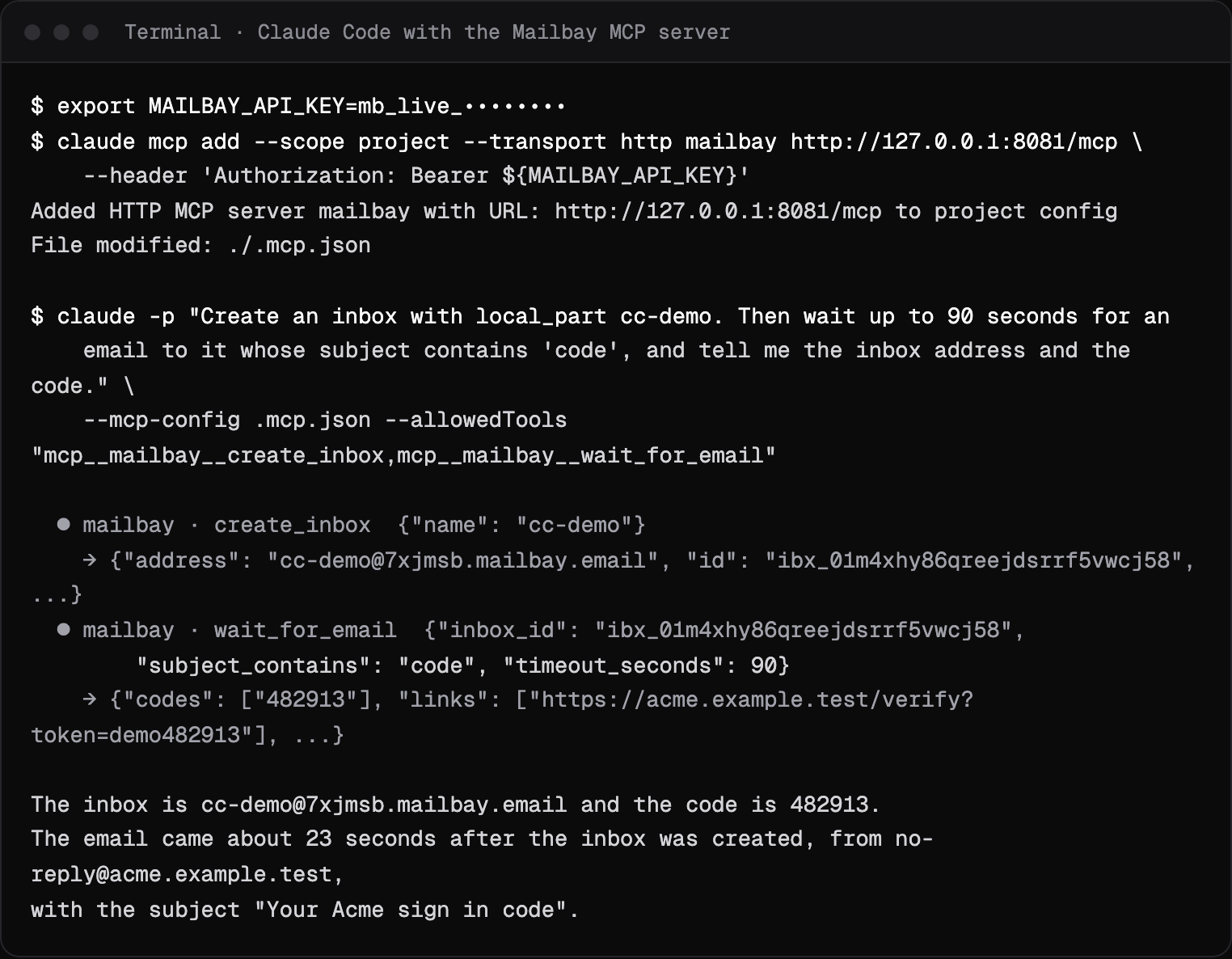
Its own inbox, not your Gmail
Most email MCP servers connect an agent to your own mailbox. Mailbay does the opposite: the agent gets inboxes of its own, on a private mailbay.email domain or on your domain. It can sign up for a service, wait for the verification code and read it, without ever seeing your mail. The tool descriptions and the remote and local servers are documented on the MCP server docs page.
Set up in one paste
Create an API key in the dashboard, export it, then add the remote server.
- 1
Export your key
Create an API key in the dashboard and export it asMAILBAY_API_KEYin your shell. - 2
Add the server
Runclaude mcp add. The single quotes matter: they store the variable name, not the key, so the config file is safe to commit. - 3
Approve it once
Startclaudein the project and approve the server. Then ask for the outcome you want.
export MAILBAY_API_KEY=mb_live_xxxxxxxxx

claude mcp add --scope project --transport http mailbay https://mcp.mailbay.dev/mcp \
  --header 'Authorization: Bearer ${MAILBAY_API_KEY}'
{
"mcpServers": {
"mailbay": {
"type": "http",
"url": "https://mcp.mailbay.dev/mcp",
"headers": {
"Authorization": "Bearer ${MAILBAY_API_KEY}"
}
}
}
}Claude Code expands ${MAILBAY_API_KEY} from the environment when it starts the server, so every teammate uses their own key.
Project or user scope
--scope projectProject
Writes.mcp.jsonin the repository. Claude Code asks each person to approve it the first time; until thenclaude mcp listshows it as pending approval.--scope userUser
Makes Mailbay available in all your projects, on your machine only.the defaultLocal
Keeps it to this project for you only.
A real run
We ran this against a local Mailbay stack on October 14, 2026. One prompt; the agent called two tools. While it waited, a test service sent a sign up code to the new address, and the agent returned it about 23 seconds later. In scripts and CI, pass the config and the allowed tools on the command line as shown, so nothing waits for approval. The capture is at the top of this page.
What the agent can do
Fifteen tools, listed by the server itself:
- create_inboxname, display_name, domain
- list_inboxes, get_inbox, delete_inboxinbox_id
- list_messagesinbox_id, limit, cursor
- get_messagemessage_id, include_html
- list_threads, get_threadinbox_id, thread_id
- send_emailinbox_id, to, cc, subject, text, html
- replymessage_id, text, html, reply_all
- wait_for_emailinbox_id, from, subject_contains, to, after, timeout_seconds (60 by default, 120 at most)
- add_domain, verify_domain, list_domainsname, domain
- create_webhookurl, event_types, inbox_id
Prompts that work well name the outcome, not the tools: “Sign up for the newsletter at example.com with a new inbox and tell me the confirmation link.” For agents that sign up often, skip creating inboxes and have them wait on the Catch-all with a fresh address each time, as described in an email inbox for your AI agent. Building agents for a living? See Mailbay for AI agent builders.
If it does not connect
- 401 from the server
- The key did not arrive. Check that
MAILBAY_API_KEYis exported in the shell that startsclaude, and that the header in.mcp.jsonreadsBearer ${MAILBAY_API_KEY}. - Pending approval
- Run
claudeonce in the project and approve the server. - A tool returns an error
- Mailbay's errors carry a code and a fix, such as
inbox_limit_reachedwith the command to delete an inbox. The agent can usually follow the fix; the full list is on the errors page. - wait_for_email times out
- Nothing matching arrived within
timeout_seconds. Call it again, and pass the inbox'screated_atasafterif the mail may already be there.
Using Cursor as well? The same server works there with a .cursor/mcp.json. Coming from AgentMail? See the AgentMail alternative page for what changes. All integrations are on the integrations page. Tip: for an agent that only needs one address, give it an inbox key.
Questions
Can Claude Code read my Gmail with this?
No. Mailbay's MCP server gives the agent its own inboxes on Mailbay. It never connects to your personal mailbox, which is the point: the agent signs up and receives codes without access to your mail.
Does the Mailbay MCP server support OAuth?
Not yet. It takes an API key in the Authorization header today. OAuth sign in, so a client needs no key, is planned.
Can I limit what the agent can touch?
Yes. Create an inbox key in the dashboard: it can read, wait, reply and send from one inbox and nothing else. Give that key to the agent instead of a full key.
Does it work in Claude Desktop?
Claude Desktop reads an mcpServers config. Use the local stdio server, mailbay-mcp stdio, with your API key; the MCP docs page has the config.
Related integrations

Read next
Join the beta
Mailbay is in private beta and free while the beta runs: inboxes, sending, your own domains and MCP. We invite people in small batches and read every note on the form.